• Home
  • About me
  • FALV
  • ALV Grid in the nutshell
    • Basic Information
    • Field catalog
  • Articles
    • Tricks
    • FALV (Fast ALV Grid)
    • ALV Grid in the nutshell
    • Tips
    • How to...
    • For beginners
    • Thoughts
  • By Topic
    • ALV
    • ALV OO
    • SALV
    • GOS
    • Selection screen
    • Purchase Requisitions
    • Purchase Orders
    • Attachments
    • Others
    • Characteristics
    • Sample Programs
    • ZIP
    • OLE
    • Mails
    • Routings
    • EWB
    • Excel
  • Keywords
  • RSS
  • Download
  • Home
  • Articles
  • ALV Grid in the nutshell

ALV Grid in the nutshell: Field catalog - no_zero

Details
Łukasz Pęgiel
ALV Grid in the nutshell
27 June 2019
Hits: 7695
Tags: CL_GUI_ALV_GRID , ALV GRID IN THE NUTSHELL , FIELDCATALOG , LVC_T_FCAT , NO_ZERO , ALV GRID

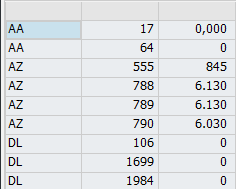
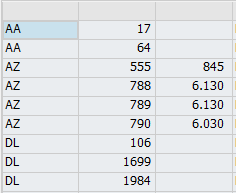
This setting is usable when we don’t want to display values that are equal 0. It works for numeric fields. I use this setting for better visibility of data in the grid. To use it set value of this field to ‘X’.


Figure 49 ZDEMO_AIN_CL22 NO_ZERO field empty


Figure 50 ZDEMO_AIN_CL22 NO_ZERO field set to 'X'


Add a comment

ALV Grid in the nutshell: Field catalog - col_pos

Details
Łukasz Pęgiel
ALV Grid in the nutshell
24 June 2019
Hits: 8491
Tags: CL_GUI_ALV_GRID , ALV GRID IN THE NUTSHELL , FIELDCATALOG , LVC_T_FCAT , COL_POS , ALV GRID

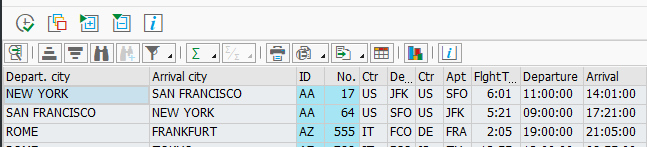
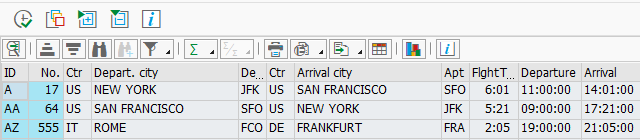
This field is responsible for setting up columns in proper order while displaying the grid without using of saved layout. It may be useful if you don’t allow your users to save their own or global grid layouts, so then the grid looks always the same for them. Personally I leave this almost always empty, but if needed just simply use INTEGER values to setup correct sorting. The demo program that can be found in Figure 11 can be used to see the difference between standard sorting and own one. 


Figure 11 ZDEMO_AIN_CL05 COL_POS


Own sorting firstly takes care about positions of columns from field catalog, then it displays the rest. If I would not pass parameter I_STRUCTURE_NAME then only this fields which are in table FCAT would appear on the screen.


Figure 12 ZDEMO_AIN_CL05 Own Sequence


Figure 13  ZDEMO_AIN_CL05 Standard sequence


Add a comment

ALV Grid in the nutshell: Field catalog - fieldname

Details
Łukasz Pęgiel
ALV Grid in the nutshell
24 June 2019
Hits: 8121
Tags: CL_GUI_ALV_GRID , ALV GRID IN THE NUTSHELL , FIELDCATALOG , LVC_T_FCAT , FIELDNAME , ALV GRID

This field is one of the basic ones in field catalog. It contains the fieldname of internal table that will be used in our grid. Although LVC_T_FCAT is standard table, then this field should be treated as key field, as in fact it is. If you fill this field manually, then please remember to put the field names in UPPER CASE.

You have to also remember that if field catalog will not contain all fields from the table and you don’t pass the dictionary name to parameter I_STRUCTURE_NAME of SET_TABLE_FOR_FIRST_DISPLAY method, then it will only display this fields, which are in field catalog. 

In Figure 14 you can see that, the field catalog is created manually with only field names inside. I also do not pass I_STRUCTURE_NAME parameter, so then only field catalog will be used to prepare the display of internal table. As I haven’t filled anything in there beside the name of the field, the output will be really poor. We will have data displayed in our grid, but without any descriptions in header, without any formatting or search helps.


Figure 14 ZDEMO_AIN_CL06 Field catalog with only field names


Figure 15 ZDEMO_AI_CL06 Results


Add a comment

ALV Grid in the nutshell: Field catalog - tabname

Details
Łukasz Pęgiel
ALV Grid in the nutshell
24 June 2019
Hits: 5556
Tags: CL_GUI_ALV_GRID , ALV GRID IN THE NUTSHELL , FIELDCATALOG , LVC_T_FCAT , TABNAME , ALV GRID

The name of this field suggest to put here an internal table name, but it seems that it has no function at all. When SAP fills field catalog automatically, then value of this field is set to ‘1’. You can completely omit this field, as if you fill it then nothing will happen, even if you use different values for each field in field catalog.

Figure 16 ZDEMO_AIN_CL07 Tabname filled


Add a comment

ALV Grid in the nutshell: Field catalog - currency

Details
Łukasz Pęgiel
ALV Grid in the nutshell
24 June 2019
Hits: 10385
Tags: CL_GUI_ALV_GRID , ALV GRID IN THE NUTSHELL , FIELDCATALOG , LVC_T_FCAT , CURRENCY , ALV GRID

When you have a field that contains an amount, for example net value of an sales order, then in order to show it correctly in the grid you should fill or this field with an value of currency key (one of entries from TCURC table). You can leave this field of course empty and in many case you will, especially if you use CFIELDNAME instead. 

In many situations changing the of currency here will not make difference to the output, but there are some exceptions, for example JPY (Japanese Yen) don’t have decimal places. Figure 17 displays value of 42 294 whereas the internal value of field is 422,94. If we use ZDEMO_AIN_CL08 program with USD currency then as you seen in Figure 18, the value shown is equal to 422,94. Both outputs are correct as long as the currency of the corresponding line is the same as in field catalog.


Figure 17 ZDEMO_AIN_CL08 Output using JPY


Figure 18 ZDEMO_AIN_CL08 Output using USD


That’s why the CFIELDNAME is very handy to use in that situations where you have different currencies for different rows.


Add a comment

ALV Grid in the nutshell: Field catalog - cfieldname

Details
Łukasz Pęgiel
ALV Grid in the nutshell
24 June 2019
Hits: 7933
Tags: CL_GUI_ALV_GRID , ALV GRID IN THE NUTSHELL , FIELDCATALOG , LVC_T_FCAT , CFIELDNAME , ALV GRID

CFIELDNAME can be read as currency field name. When you have in your internal table a field that represents the currency for the amount stored in a field kept under FIELDNAME in field catalog, then you should place its name here. The output of the cell will be then based on a currency key kept in the same row of the internal table, in the corresponding field. 

In the sample program ZDEMO_AIN_CL09 you can see that I passed to the filed catalog CFIELDNAME as ‘CURRENCY’ which is one of the columns of table SFLIGHT, that keeps currency key for field PRICE.


Figure 19 ZDEMO_AIN_CL09 CFIELDNAME filled

 As data in this table didn’t contained a line with JPY, I’ve changed in SE16 the currency key for one of the rows in order to show you the difference in output.


Figure 20 Changed entry of SFLIGHT table in SE16


As the output of the PRICE column depends now on the currency key stored in CURRENCY column, then you can see in the first row that the price is without decimal places, as it should be for Japanese Yen, and in the next rows as we have USD then we see two decimal places.

Figure 21 ZDEMO_AIN_CL09 results


Add a comment

ALV Grid in the nutshell: Field catalog - quantity

Details
Łukasz Pęgiel
ALV Grid in the nutshell
24 June 2019
Hits: 10477
Tags: CL_GUI_ALV_GRID , ALV GRID IN THE NUTSHELL , FIELDCATALOG , LVC_T_FCAT , QUANTITY , ALV GRID

QUANTITY field is very similar to CURRENCY. The difference here is that you don’t keep currency key here, but unit of measure, for example M for meters or KG for kilograms. Again to show you the difference in output I’ve modified a bit the table entries, this time field DISTANCE from SPFLI table, where I’ve included decimal places for first row.


Figure 22 Changed entries of SPFLI table in SE16

Now to see the differences, please run program ZDEMO_AIN_CL10 using following units: PMR, DEG, M & empty.

Figure 22 displays the values with three decimal places as PMR is setup to be displayed exactly like this.


Figure 23 ZDEMO_AIN_CL10 Results using PMR unit

Figure 23 shows the results when I used DEG unit which shows. In default this unit is set to have one decimal place. As you can see there everywhere where DISTANCE field has less or the same number of decimal places then it’s always shown with one decimal place (even, if after comma there is an 0). In case the quantity value contains more decimal places, like on the first row, then the value is displayed fully as written into internal table.


Figure 24 ZDEMO_AIN_CL10 Results using DEG unit

The same situation you can see if you use meters. No decimal places are visible in the rows for which the value doesn’t have any decimals, but if it’s the case then the full value is displayed.


Figure 25 ZDEMO_AIN_CL10 Results using M unit

At last I have run ZDEMO_AIN_CL10 without using any unit. As expected the internal value is displayed exactly like stored in internal table, so with four decimal places.


Figure 26 ZDEMO_AIN_CL10 Results without filling unit


Add a comment

ALV Grid in the nutshell: Field catalog - ifieldname

Details
Łukasz Pęgiel
ALV Grid in the nutshell
24 June 2019
Hits: 2748
Tags: CL_GUI_ALV_GRID , ALV GRID IN THE NUTSHELL , FIELDCATALOG , LVC_T_FCAT , IFIELDNAME , ALV GRID

Although the SAP name of this field says: “Field name of internal table field”, then I haven’t found any usage of this field. It’s also not filled by SAP when you use SALV for creating field-catalogs. It may be that this field is not used at all.

Add a comment

More Articles ...

  1. ALV Grid in the nutshell: Field catalog - round
  2. ALV Grid in the nutshell: Field catalog - qfieldname
  3. ALV Grid in the nutshell: Field catalog - exponent
  4. ALV Grid in the nutshell: Field catalog - key
Page 4 of 6
  • Start
  • Prev
  • 1
  • 2
  • 3
  • 4
  • 5
  • 6
  • Next
  • End


Łukasz Pęgiel
SLICENSE ALV GRID TOTLINE Classifications - Part 2 - Get Object Details ROUND BAPI OBJCL GETDETAIL CREATE COM IXML PARSER SAP DEVELOPMENT TOOLS FOR ECLIPSE Use RM07DOCS ZDEMO FALV11 - Editable Grid settings EXPORT TO MEMORY ID PROVIDE OPR STREAM FACTORY ATC FIELDCATALOG CHANGE ALV GRID IN THE NUTSHELL SUM Classifications - Part 4 - example of use INTLEN Zipping in IZArc with ABAP directly on PC QUANTITY KEY SAP Community Events FALV F4IF GET SHLP DESCR BINARY RELATION COMMIT Get filename and extension from full path ABAP IN ECLIPSE ABAP HTML DELETE USER SETTINGS EXCHANGERATE SAVE OBJECTS ALV Grid in the nutshell Field catalog - ifieldname LVC FCAT FALV14 - Popup calls MEPO151 GUI ALV GRID ABAP TABLEDESCR MS OUTLOOK TVCPLAP VRM SET VALUES FRONTEND SERVICES GTENVIRONMENT VARIABLE COMPONENTS REFRESH DARKEST DARK THEME SE41 Popup with multi-select ALV Field catalog - fix column Field catalog - fieldname BOM STARTING NEW TASK SCMS DOC READ XSTRING Field catalog - emphasize RELEASABLE START VALUE REQUEST ESDUS GUI TITLE ABAP EXTENSIONS OUTPUTLEN RSFUNC TXT GOS MANAGER Field catalog - col id - ALV control Column ID
Tweets by abapblog

Eclipse Plugins for ABAP

ABAP Favorites

Drag to your running Eclipse* workspace. *Requires Eclipse Marketplace Client

ABAP ADT Extensions

Drag to your running Eclipse* workspace. *Requires Eclipse Marketplace Client

ABAP Quick Fixes

Drag to your running Eclipse* workspace. *Requires Eclipse Marketplace Client


Latest Articles

  • ABAP in Eclipse - Install, Configure, Use, and Enhance Your ADT
  • ALV Grid in the nutshell: Field catalog - col_id - ALV control: Column ID
  • ALV Grid in the nutshell: Field catalog - dfieldname – Fieldname for column group
  • ALV Grid in the nutshell: Field catalog - Hotspot - ALV control: SingleClick-sensitive
  • ALV Grid in the nutshell: Field catalog - sp_group - Group key
  • ALV Grid in the nutshell: Field catalog - domname - Domain name
  • ALV Grid in the nutshell: Field catalog - reprep - ALV control: Value is selection criterion for rep./rep.intf.
  • ALV Grid in the nutshell: Field catalog - reptext – Heading
  • ALV Grid in the nutshell: Field catalog - lowercase - Lowercase letters allowed/not allowed
  • ALV Grid in the nutshell: Field catalog - intlen - Internal Length in Bytes
  • Downloading Exchange Rates from NBP (National Bank of Poland)
  • Downloading Exchange Rates from Central Bank of Turkey
  • ABAP Extensions - Automatic Logon
  • ALV Grid in the nutshell: Field catalog - inttype - ABAP data type (C,D,N,...)
  • ALV Grid in the nutshell: Field catalog - datatype

Most Read

  • Create XLSX/MHTML file from internal table in background
  • Refresh ALV GRID and keep position and current cell
  • Create XLSX file from internal table in background v2
  • FALV (Fast ALV Grid)
  • ATC Pseudo Comments list
  • Call standard F4 search help with customized parameters
  • Dynamic GUI STATUS & TITLE with ABAP code
  • Create fieldcatalog from internal table
  • Link Attachments of Purchase Requisition to Purchase Order
  • Endless loop in BADI ME_PROCESS_PO_CUST
  • GOS - How to add business documents at creation of object
  • Create a nice looking chart with CL_GUI_CHART_ENGINE - Part 3 - Chart Data and render
  • How to access private or protected data and methods of CL_GUI_ALV_GRID
  • How to handle CL_GUI_ALV_GRID events in SALV
  • Subtotal lines of ALV GRID OO as content separator

Latest Comments

ABAP code and articles provided on http://abapblog.com, if it is not statet otherwise, were created by Łukasz Pęgiel. You can use the code in your SAP instance for commercial and non-commercial use without any warranty from side of the author. You cannot sell the code as a full program or a part of it.
Replicating of the articles and code is prohibited unless the agreement of the author is given to you. 

Bootstrap is a front-end framework of Twitter, Inc. Code licensed under MIT License. Font Awesome font licensed under SIL OFL 1.1.